
- March 13, 2026
- by Parbeshkumar Maurya
The Ultimate Guide to Email Preheaders: How the Small Inbox Line Drives Higher Email Opens
A few years ago, a marketing manager shared a puzzling problem with us.
Their email campaigns looked great. The design was polished, the offers were strong, and the audience was highly relevant. Yet open rates were consistently lower than expected.
At first glance, nothing seemed wrong. The subject lines were compelling, and the sender reputation was strong. But when we looked closely at how the emails appeared inside the inbox, we spotted the issue almost immediately.
The preheader was missing.
Instead of a meaningful preview, inboxes were showing random system text like: “View this email in your browser.”
Not exactly something that motivates people to open an email.
We rewrote the preheader to support the subject line.
Subject line: “Your Weekend Deal Is Waiting”
Preheader: “Open now to unlock 20% off your favorite items.”
Nothing else changed. Same design, same audience, same offer.
The result? Open rates increased by 17% in the next campaign. That small line of text, often overlooked by marketers, made the difference.
And that’s why understanding email preheaders is essential for anyone serious about email marketing.
In this guide, we’ll explore:
What Is an Email Preheader?
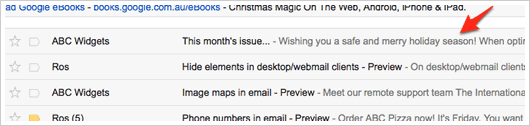
An email preheader is the short preview text that appears next to or below the subject line in a recipient’s inbox.
Think of it as the second headline of your email.
Most email clients like Gmail, Apple Mail, and Outlook show around 35–140 characters of preview text depending on device and platform.
For example:
Subject line:“Flash Sale Ends Tonight”
Preheader: “Save up to 40% before midnight.”
Together, the subject line and preheader act like a one-two punch that convinces readers to open the email.
Without a good preheader, inboxes often display random text pulled from the email body such as:
- “View this email in browser”
- “Unsubscribe here”
- “Image not displayed”
These wasted preview spaces reduce the effectiveness of your inbox preview and can significantly lower open rates.
Why Email Preheaders Matter
1. They Increase Email Open Rates
Your preheader is one of the first things subscribers see in the inbox. Along with the sender name and subject line, it helps readers decide whether an email is worth opening. A compelling preheader can add context, highlight the benefit of opening the email, or create curiosity, all of which encourage higher open rates.
According to industry benchmarks from Campaign Monitor and Mailchimp, average email open rates across industries typically range between 20% and 25%, which means many emails go unread.
2. They Reinforce the Subject Line
3. They Provide Additional Context
Sometimes subject lines are short due to character limits. Preheaders allow you to add extra information that clarifies the purpose of the email.
For example, a subject line like: “Something special for you”
Becomes much clearer when paired with: “Your exclusive birthday reward is inside.”
This additional context increases the likelihood of engagement.
4. They Help Emails Stand Out in a Crowded Inbox
Most people receive dozens or even hundreds of emails daily. A well-written preheader helps your message stand out by providing a clear and compelling preview of what the email contains.
When subscribers quickly scan their inbox, a meaningful preheader makes your email appear more relevant than others.
Now that we understand why preheaders matter, the next step is learning how to write them effectively
1. Complement the Subject Line — Don’t Repeat It
Your preheader should work with the subject line, not duplicate it. Think of the subject line as the headline and the preheader as the supporting sentence that adds detail or value.
For example:
Subject: Weekend Special
Preheader: Enjoy 20% off your favorite dishes today.
2. Keep It Short and Clear
Most inbox previews show 40–90 characters of preheader text depending on device and email client. Place the most important message early so it’s visible on both mobile and desktop.
Clarity is more important than length. A simple, benefit-driven preheader works best.
3. Highlight Value or Benefit
A strong preheader answers the subscriber’s question: “What’s in it for me?”
Examples include:
- “Unlock your exclusive discount today.”
- “See what’s new in our summer collection.”
- “Your personalized recommendations are ready.”
This approach makes the email feel more relevant.
4. Create Curiosity or Urgency
Sometimes curiosity encourages readers to click. Urgency also works well for limited-time promotions.
Examples:
- “Only a few hours left to claim your deal.”
- “You won’t want to miss this surprise.”
- “Early access ends tonight.”
However, avoid misleading or exaggerated claims, as they can reduce trust.
5. Personalize When Possible
- “John, your exclusive offer is inside.”
- “Recommended picks based on your last purchase.”
6. Avoid Default or System Text
One of the most common mistakes is leaving the preheader blank, allowing inboxes to display text like:
- “View this email in browser”
- “Click here to unsubscribe”
These lines waste valuable preview space and reduce the impact of your email. Always define your preheader intentionally.
7. Test and Optimize
- Urgency vs curiosity
- Benefit-driven vs descriptive
- Personalized vs generic
Examples of High-Performing Email Preheaders
Example:
Subject: Your Weekend Deal Is Here
Preheader: Open now to unlock 25% off.
Subject: Something new just dropped
Preheader: You’ll want to see this first.
Subject: Flash Sale Starts Now
Preheader: Save up to 40% before midnight.
Common Preheader Mistakes to Avoid
Many email campaigns underperform because of simple but avoidable mistakes.
- One common issue is letting the email client generate the preview automatically. If the preheader isn’t defined, inboxes often display text like: “Having trouble viewing this email?” This wastes valuable attention.
- Another mistake is writing preheaders that are too long. If the important message appears after 100 characters, many users will never see it.
- Finally, avoid repeating the subject line. Your preheader should complement the subject, not copy it.
Final Thoughts: Small Text, Big Impact
In email marketing, success often depends on small details.
Preheaders may seem like a minor part of a campaign, but they play a critical role in whether an email gets opened at all.
When combined with a strong subject line, a well-crafted preheader creates a compelling reason for subscribers to engage. It clarifies the message, reinforces the value, and nudges readers toward action.
So before you send your next campaign, take a moment to check that small line of preview text.
Because sometimes the difference between an ignored email and a successful campaign comes down to just a few carefully chosen words in that small inbox preview.
Connect with Us Today to Elevate Your Email Performance
